
Chat Face

Chat Zalo

Phone

Office equipment, IT, telecom devices.
Technology development equipment
Industrial automation equipment
Components and accessories for electric vehicles
Measuring instruments
Home Appliances


Contact support for detailed quote: Hotline: 0386365636 - Mr.Sơn
Buy at Vina Connect Showroom See directions
Samsung QLED 4K Vision AI 55-inch QA55Q8F Smart TV: Elevate Your Smart Home Entertainment Experience
Elegant Design – A Refined Highlight for Any Space
The Samsung QLED 4K Vision AI 55-inch QA55Q8F Smart TV features a perfectly balanced 55-inch display, ideal for living rooms or bedrooms. With ultra-thin bezels and a minimalist stand, it seamlessly complements any interior décor. Every detail is crafted with precision, reflecting a modern and premium aesthetic—whether wall-mounted or placed on a stand, this TV elevates your living space like a statement piece of furniture.

AI Q4 Processor – Intelligent Optimization for Picture and Sound
Equipped with Samsung’s advanced AI Q4 processor, the TV analyzes and adjusts picture quality in real time. Using machine learning, it recognizes content types and fine-tunes color, brightness, and sharpness accordingly. The result: stunning 4K visuals and optimized sound, whether you’re watching a movie or an intense sports match.

Quantum Dot Technology – True-to-Life, Vivid Colors
The Quantum Dot display reproduces over one billion shades of color within the DCI-P3 standard. Every frame—from vibrant scenes to darker tones—is rendered with incredible depth and accuracy. You’ll experience lifelike imagery, from the deep blue of the ocean to the warm hues of a sunset.

Color Booster Pro – Enhanced Color Depth and Accuracy
Working alongside Quantum Dot, Color Booster Pro enhances every hue with precision and vibrancy. Each frame gains greater depth and richness, making artistic films or nature documentaries appear more realistic and captivating.
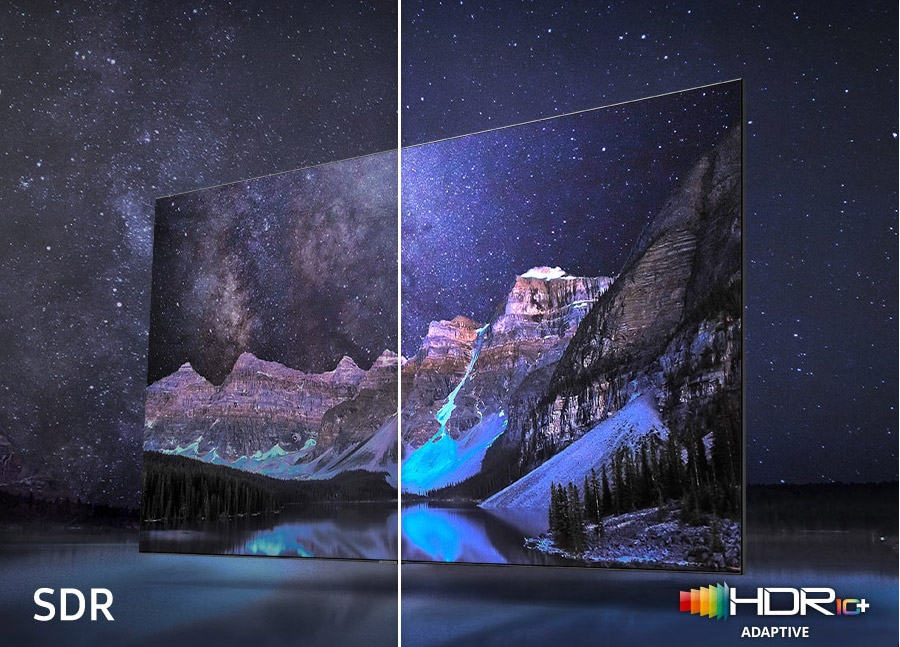
Quantum HDR+ – Capturing Every Highlight and Shadow
Quantum HDR+ technology delivers superior contrast, revealing intricate details in both bright and dark scenes. Action sequences and nighttime shots appear more dynamic and true-to-life, ensuring no detail goes unnoticed.
Active Voice Amplifier – Never Miss a Word
Active Voice Amplifier automatically adjusts dialogue volume when it detects background noise, ensuring you catch every word—even in noisy environments.

OTS Lite – Sound That Moves with the Action
Object Tracking Sound (OTS) Lite creates a 3D audio experience that follows on-screen movement, immersing you deeper into every scene.

User-Friendly One UI Tizen System
Powered by Samsung’s intuitive One UI Tizen platform, the TV offers fast, stable performance and easy access to apps like Netflix, YouTube, and Spotify for endless entertainment.

SolarCell Remote – Eco-Friendly Power
The SolarCell Remote recharges via sunlight or indoor lighting, eliminating disposable batteries and contributing to a greener future.
With its elegant design, advanced picture processing, and smart features, the Samsung QLED 4K Vision AI 55-inch QA55Q8F Smart TV is the perfect choice for any entertainment need—from movie enthusiasts and gamers to those seeking a sophisticated, intelligent home device.
| Category | Detailed Information |
|---|---|
| Model | QA55Q8F5AKXXV |
| Type | Smart QLED AI 4K TV |
| Screen Size | 55 inches |
| Resolution | 4K UHD (3840 × 2160) |
| Release Year | 2025 |
| Processor | AI Gen2 – AI-powered image and sound enhancement |
| Picture Technology | Quantum Dot, HDR10+, Quantum HDR, UHD Dimming, Contrast Enhancer |
| Refresh Rate | 100Hz – Motion Xcelerator |
| Operating System | Tizen OS 2025 |
| Audio | Dolby Atmos, OTS Lite, Adaptive Sound, Q-Symphony |
| Speaker Output | 20W (2 channels) |
| Remote | SolarCell Remote TM2360E |
| Voice Assistant | Bixby, Google Assistant, Amazon Alexa (Vietnamese supported) |
| Wireless Connectivity | Wi-Fi 5, Bluetooth 5.2 |
| Screen Mirroring | Tap View, Smart View, AirPlay 2 |
| Ports | HDMI ×4 (with eARC), USB ×2, LAN, Optical, RF |
| Smart Home Integration | Supported – SmartThings, Matter, Thread |
| Dimensions (without stand) | 1232.1 × 708.5 × 25.7 mm |
| Dimensions (with stand) | 1232.1 × 774.3 × 224 mm |
| Weight | ~16.1 kg (without stand), ~17.3 kg (with stand) |
| Origin | Vietnam |
| Warranty | 24 months official nationwide warranty |
A. Initial Setup
Installation:
Mount on the wall using a VESA 200x200 mm standard bracket or place on a table with the included stand.
Avoid direct sunlight and heat-emitting devices.
Startup and Configuration:
Plug in the power → press the Power button or use the remote to turn on the TV.
Select language, connect to Wi-Fi/LAN, and log in to your Samsung account.
Go to Settings > Support > Software Update to install the latest system version.
B. Feature Usage
Wireless Screen Mirroring:
Android: Smart View or Tap View.
iOS: AirPlay 2 from iPhone/iPad.
Vietnamese Voice Search:
Press the microphone button on the remote → give natural voice commands such as “Open YouTube” or “Increase volume.”
App Store Access:
Go to Apps to install popular applications like Netflix, YouTube, Galaxy Play, FPT Play, Spotify, etc.
Audio – External Speaker Connection:
Connect a Samsung soundbar via Bluetooth or HDMI eARC to use Q-Symphony for immersive sound.
Smart Home Control:
Use the SmartThings app on your phone to connect and control the TV, lights, air conditioner, and other smart devices.
C. Cleaning and Maintenance
Screen Cleaning:
Turn off the power, use a soft dry cloth to gently wipe the screen.
Do not use chemical cleaners or spray water directly.
Storage:
Keep in a cool, well-ventilated area and unplug the TV if not in use for an extended period.
We will contact and send a quote based on the information you provide!






.webp)